
Hear It Before You Request It
Your guests tap any song and hear an official 30-second clip on their own phone, then request it in the same tap. Nobody has to request a song and hope it is the right one.
- Thirty seconds, usually the chorus
- Plays on their phone, never over your speakers
- Included in Core and Complete

Try before you queue
A minute on how previews work, and why they turn browsing into something people enjoy.
From curious to queued in three taps
It works from your venue's QR code in any phone's browser, or the free eJukebox Request app. Nothing to download.
Find a song
Scan the venue's QR code, then search by artist or title, browse what is trending across the country, or tap Help me pick and describe what you are after.
Tap to preview
Tap any track for an official 30-second clip, usually the chorus. It plays on the guest's own phone, so the room never hears it.
Request it
Like what you hear? Request it in the same tap. The venue's rules decide what can be requested and how often.
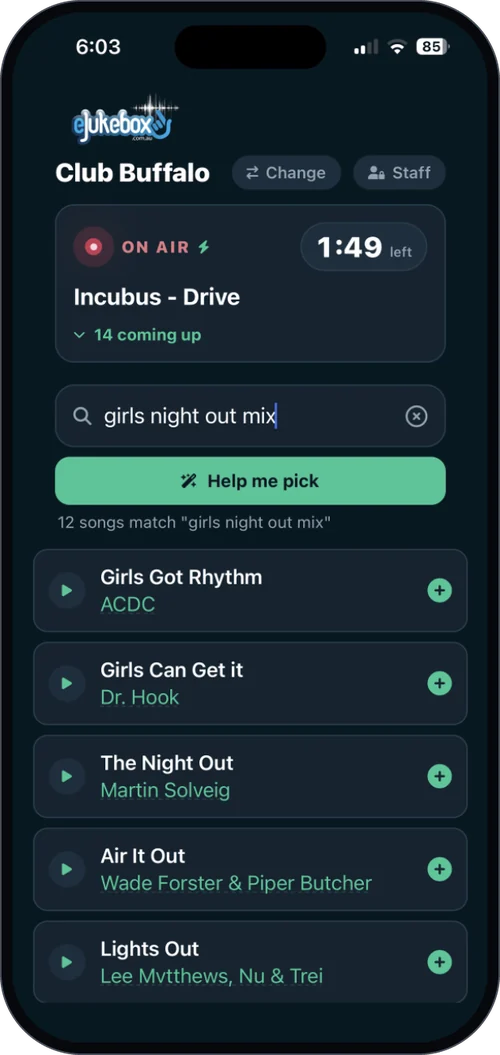
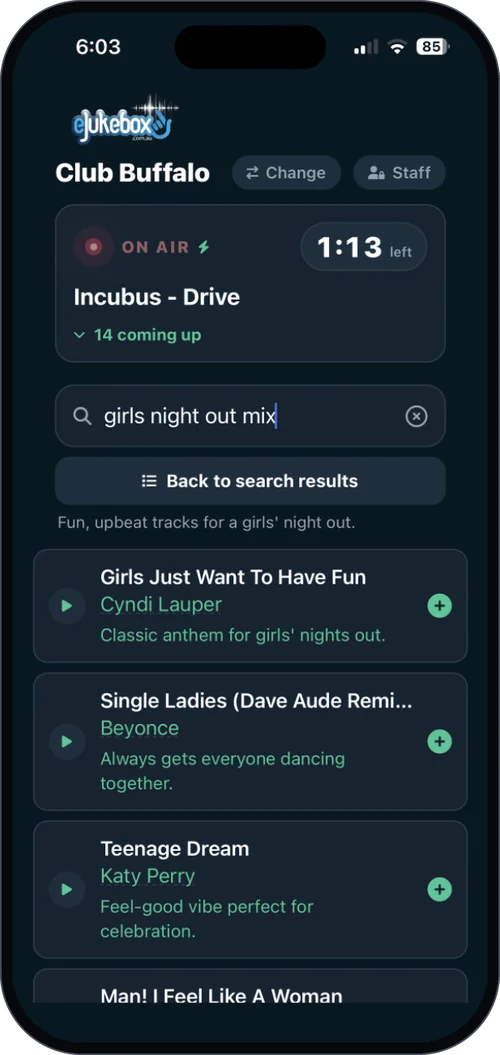
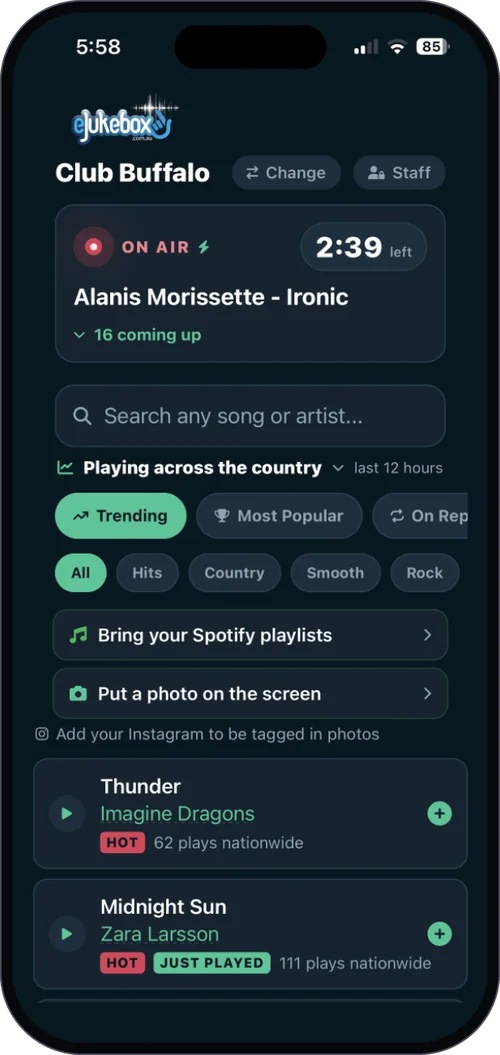
Every way to find a song comes with a preview
They know the song
Search
Search by artist or title and every result carries a preview, so the right version is the one that goes in the queue.
Song requests →They know the feeling
Help me pick
Describe the mood and get real songs from your library to try, each one ready to preview and request.
AI Song Search ↓They want what is hot
Trending nationwide
The live grid of what venues around Australia are playing right now, filtered to your style, with a preview on every track.
Playing Across the Country →No title needed. Just say what you mean.
The hard part of requesting a song was never the requesting. It was knowing what to ask for. AI Song Search takes that away: a guest types what they actually mean, in plain English, and a list of real tracks from your library comes straight back, each one ready to preview and request.
It shines at birthdays and functions where someone wants something for Mum, at theme nights and trivia, and at any table arguing about a song none of them can name. It means the people who would never normally request a song finally do. On the request page, it is the Help me pick button.
Better requests, and more of them
No duds
The right song, first time
No guessing from a title, and no requesting the wrong version. Fewer regrets in the queue means a better run of music for the whole room.
More requests
Sampling turns into requesting
Previews turn browsing into a game people enjoy playing, and the more they sample, the more they request.
Still your room
Your rules still apply
Previews change nothing about what can be requested. You choose the library, set the limits per person, and hold or remove anything from the Admin app.
Part of song requests, at no extra cost. Previews, AI Song Search and Playing Across the Country all come with Core and Complete. Add voice dedications, Spotify playlists or a request touchscreen when you want more.
Plans & pricingWhat venues ask about song previews
Does the preview play over the venue's speakers?
No. The preview plays on the guest's own phone, so they can sample as many songs as they like without the room hearing a thing. Only the song they request goes into the queue.
How long is a song preview?
Thirty seconds, and usually the chorus - the part of the song people actually recognise.
Do guests need to download an app?
No. Previews work on your venue's request page in any phone's browser, opened from the QR code. Guests who prefer an app can use the free eJukebox Request app.
Which songs can be previewed?
Every song in the search results, in Help me pick suggestions and in the Playing Across the Country trending grid has a preview.
What is AI Song Search?
A search that understands plain English. Guests type a mood, an era, a film or an occasion - "80s Australian pub rock", "something for a 50th", "songs from that Robin Williams movie" - and get real tracks from your library to preview and request. On the request page it is the Help me pick button.
Do previews change what can be requested?
No. You still choose whether requests come from the whole library or only the current channel, and how many songs each person can request every hour, and you can hold or remove any request from the eJukebox Admin app.
Does it cost extra?
No. Song previews come with Core and Complete, along with song requests, AI Song Search and Playing Across the Country. Solo is background music only, with no requests. See plans & pricing.
Why would a venue care about previews?
Fewer wrong songs in the queue, and more requests. Nobody has to request a song and hope it is the right one, and the more people sample, the more they request.
Let the room try before it queues
Tell us about your venue and we will show you song requests, previews and AI Song Search running in a room like yours.
Tell us about your venue